Welcome, Demo! — Sign out

Season-Long Fantasy Football |
|


popup window
| Home → Tips |

Fantasy Football Tips & Tricks
Determined to win your fantasy football league this year? Here are some valuable tips for winning.
These are some of the basic tools, features, and concepts at DataForce Fantasy Football that all new customers may wish to browse. The most important topics are listed first.
Using the Bubbles & Help Text
 Throughout the site, you'll find little bubbles
  that you can mouse over for help on a topic.
Help buttons like
that you can mouse over for help on a topic.
Help buttons like  can also be found at the top of each page, and that can be even more
enlightening. Sometimes this help text answers
questions about how to operate the page, or about a feature of the page, and sometimes it provides general fantasy knowledge, such as
how to prepare a draft list. These little treasures of knowledge are worth seeking out and reading each time you find a new page on DataForce.
can also be found at the top of each page, and that can be even more
enlightening. Sometimes this help text answers
questions about how to operate the page, or about a feature of the page, and sometimes it provides general fantasy knowledge, such as
how to prepare a draft list. These little treasures of knowledge are worth seeking out and reading each time you find a new page on DataForce.
Our Online Wallet
 DataForce lets you set up an account with an on-line wallet for purchasing teams. You deposit money into your account using a
credit card, by e-check, or even mailed paper checks. That money can then be spent as you please on teams, or can be withdrawn at any
time. However, be aware that most deposit and withdrawal methods charge a small fee. You can keep your costs down by choosing the
most cost-effective methods of deposit and withdrawal, rather than the most convenient. By encouraging these cheaper methods of
money transfer, we at DataForce are able to put more money toward prizes, and can boast the highest prize return in the Fantasy Football
industry!
DataForce lets you set up an account with an on-line wallet for purchasing teams. You deposit money into your account using a
credit card, by e-check, or even mailed paper checks. That money can then be spent as you please on teams, or can be withdrawn at any
time. However, be aware that most deposit and withdrawal methods charge a small fee. You can keep your costs down by choosing the
most cost-effective methods of deposit and withdrawal, rather than the most convenient. By encouraging these cheaper methods of
money transfer, we at DataForce are able to put more money toward prizes, and can boast the highest prize return in the Fantasy Football
industry!
Your "My Leagues" Page
Don't confuse your My Leagues page on the Administration Hub (which houses all of the pages
for setting up your account and buying teams) with your My
Teams page on the Team Manager Hub (which houses the pages for managing your teams). The latter includes only those leagues which have begun, while the former includes all leagues
you have joined while in the lobby. That means you can join leagues without paying just
to keep an eye on them, paying only when it looks like there is enough interest for the league to fill.

Integrated Player Projections
At DataForce, our tool for integrating player projections from your favorite site is called The Wonk. This little
guy lets you choose your preferred site, such as FantasyPros.com and 4for4.com,
and display their projections directly on your Lineup and Game Matchup pages.
Your Owner->Setup page lets you select between sites.
In addition, The Wonk provides projection listings to help with drafting, trading, setting lineups, and bidding on waivers. For more
about third-party integration options, see our Draft & Team Management Tools.
Player Search For All Leagues At Once
DataForce has a handy little player search tool that tells you a player's status in all your
leagues at once. This is particularly useful when you hear news about a player--like, maybe a stud running back getting injured and
his handcuff moving into the starting job--and need to do some quick free agency work before all your opponents learn the news.
Player Listings and Statistics
DataForce's player list is more than just a list of players. Go there to do all sorts of player
analysis, sorting by statistics or fantasy points and viewing player statuses to see who is available for drafting or free agency or
waiver bids. Include just the last few weeks of statistics if you wish. Or, if you'd like to see a breakdown of each week's production,
switch to the League->FantasyPoints page. Note, by the way, that you can mouse over fantasy points
on this page to see the statistics behind them.
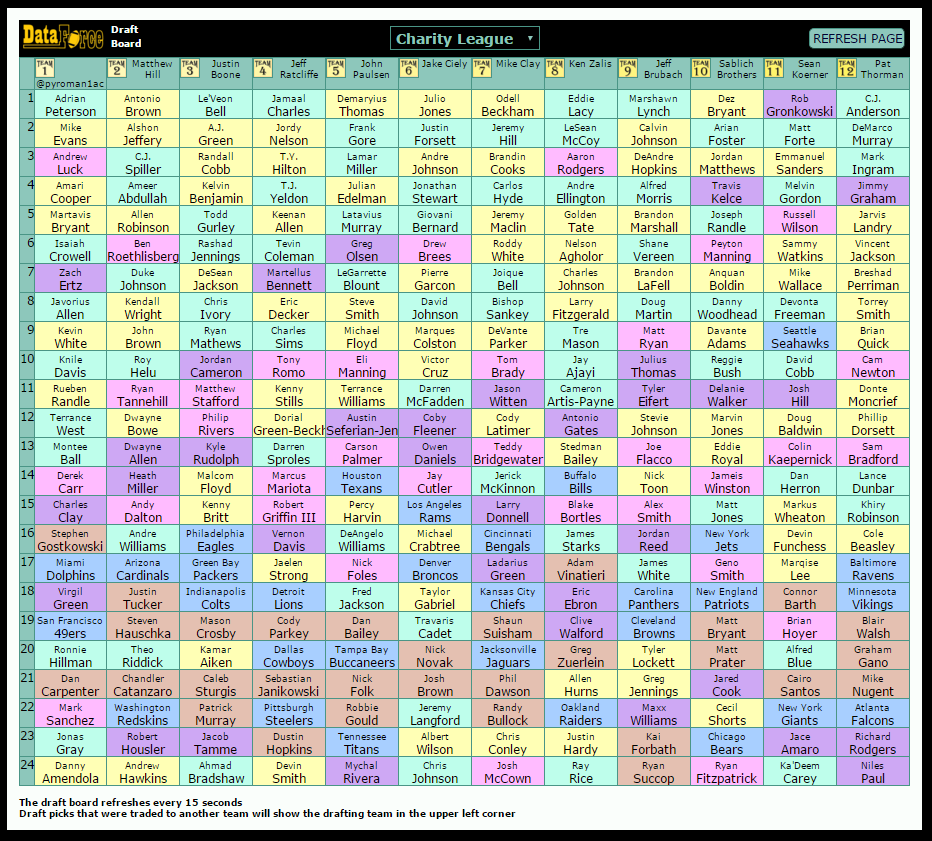
Color-Coded Draft Boards
You've probably found the draft board for your league under the Draft tab, but did you know
this interactive display is updated every few seconds? That makes it particularly useful during live drafts! Just open another window
for your draft board and follow along there while you're drafting. These draft boards are also particularly useful for studying drafts
in other leagues. You can look over the draft of any league hosted on DataForce.
Average Draft Position
Most fantasy owners are familiar with this concept, but it's so important that it's worth stressing. Every player has an "average draft
position" or ADP that tells you what round the player is usually drafted in. For example, an ADP of 3.6 means that in a 12-team league,
this player is usually selected at around the sixth pick in the third round. But how useful is that, really, when there are so many
different types of leagues and lineups: dynasty leagues, keeper leagues, superflex lineups, deep lineups, and more? Use DataForce's
Average Draft Position page to learn when each player is most likely to be drafted in each type of contest.
Setting Contact Preferences
You'll want to visit your Owner->Setup page first thing, each time a new league begins. This is
where you can choose your team name, upload a team logo, and choose the league activities for which you want to be notified, by email and by
text message. In particular, note the Player Analysis Link on this page. This is where you can choose your favorite site for
player links, for help in researching news about fantasy players. And one more note about this page and the use of text messages: All
such messages are automated, so we must know your mobile carrier in order to send you texts! Make sure that on your
My Account page you have specified not only your phone number but also the carrier.
Mobile-Friendly Interface
 DataForce offers both a mobile app and a mobile-friendly web version. Download the app from your app store, or just access the site normally
from a mobile device like a phone. When you do this, it will usually recognize that device and go directly to the mobile version. Some people like using our compact
Mobile Manager software and some prefer the full-screen version designed for computers, even on their
mobile devices. For that reason, we
allow you to choose your preference between the two on your My Account page. You can always switch
between the two versions after your preferred version comes up.
DataForce offers both a mobile app and a mobile-friendly web version. Download the app from your app store, or just access the site normally
from a mobile device like a phone. When you do this, it will usually recognize that device and go directly to the mobile version. Some people like using our compact
Mobile Manager software and some prefer the full-screen version designed for computers, even on their
mobile devices. For that reason, we
allow you to choose your preference between the two on your My Account page. You can always switch
between the two versions after your preferred version comes up.
Waivers and Free Agency
These two terms are sometimes used interchangeably, but at DataForce, they mean two very different things. Waivers always refers
to the Wednesday evening blind bidding process, which is available in the preseason and each week of the regular season. When a player is
dropped from a team, he goes to waivers, so that each team gets an equal shot to pick him up, by being the high bidder. But after
waivers are run each Wednesday of the regular season, any unwanted players still available become Free Agents
and can be picked up on the Free Agency page. (There is no free agency in the preseason.)
Using the Notepad
 There's a little hidden notepad that you can use to take notes behind every one of your teams. Keep track of what you need to do, what
sort of players you need to trade for, or who to bid on next waiver period in the notepad. Just go to the Dashboard
and click the notepad icon near the top. Once you start taking notes, that notepad will also be available on your My Teams page,
so you can see all teams at once that have notes.
There's a little hidden notepad that you can use to take notes behind every one of your teams. Keep track of what you need to do, what
sort of players you need to trade for, or who to bid on next waiver period in the notepad. Just go to the Dashboard
and click the notepad icon near the top. Once you start taking notes, that notepad will also be available on your My Teams page,
so you can see all teams at once that have notes.
Linking with MyFantasyLeague.com
Is your league hosted on MyFantasyLeague? You can still take advantage of DataForce's tools, such as The Wonk,
our live stats feed, and our handy player search page. But before
taking advantage of these tools, it's best to make sure DataForce's league database is in sync with MyFantasyLeague. Here's how you can
quickly sync your leagues between the two sites, making sure the rosters are up-to-date: Go to MyTeams->RefreshFromMFL on
the DataForce Team Manager hub.
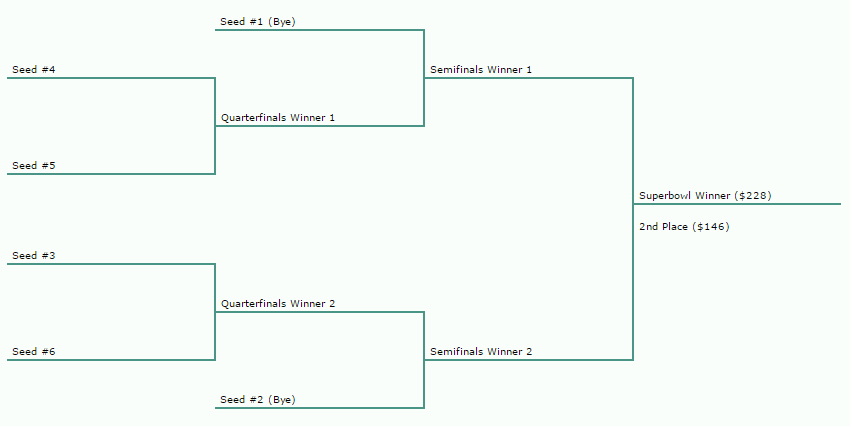
Playoff Seeding Here is Different
A quick look at DataForce's fantasy playoffs page will show you that we do playoff seeding just a little
different here. In addition to the top four teams in the standings, you can also earn a spot in the playoffs by total points. The two
teams scoring the most fantasy points for the year are also seeded. Therefore, every point counts, every week.
Trade Reviews
Another feature of DataForce Fantasy Football is that full-trade leagues allow trading bid dollars, auction dollars, draft picks, even
future-year draft picks in multi-year leagues. With all of these trade options, it can be difficult to analyze whether or not a trade
is fair. Therefore, a trade review can be requested by any owner at any time for any
trade. A "review" means inviting all other owners in the league, plus ten random people in similar leagues, to weigh in on whether a
trade is fair and should be allowed, or whether it's so imbalanced that it should be disallowed for possible collusion. Roughly 1 in every
50 trades is overturned in this manner, to keep all leagues fair.

The Trade Balancer
In order to help you put together trades that will be accepted by the commissioner, DataForce provides a rudimentary
Trade Balancer. You'll find this on the player trade pages.
Don't be fooled into thinking this is a full-scale trade evaluator, to help
you decide if a trade is good for you or not! It makes no attempt to analyze projections. It uses only the rankings of
a collection of experts, in order to estimate public opinion. The intent of DataForce's trade balancer is not to decide if a trade is
fair; it is to decide whether a trade is so imbalanced according to public opinion that it warrants consideration as collusion.
Potential Points and Next Year's Draft Position
If you play in any dynasty leagues or keeper leagues, you absolutely must get a handle on Potential Points.
Next year's draft position won't be determined by your record this year, unless you're a playoff contender (the teams who make the
quarterfinals will be seeded into the last four spots in next year's draft.) Instead, potential points is a calculation of how
well your players performed, and the lower your potential points, the earlier your draft position. There is never any benefit to losing
a game on purpose!
Preparing a Draft List
When you draft, whether by email (slow) draft or by live draft, there are several methods of listing available players. For example, you
can list alphabetically or you can list by Average Draft Position (ADP). But there's also a third option: You can
prepare a draft list ahead of time, and order your available players by that list. This list can be built
one player at a time by dragging and dropping, or you can simply import a list from Fantasy Sharks or Fantasy Pros as your starting
point. Important: this list will be used for all your drafts this year until you either rebuild or delete it. One more thing
you should know about draft lists: If you miss a pick (by making no selection before the deadline), the computer normally takes the
top player available according to Average Draft Position. But if you have prepared a draft list, the computer will select the top player
from your personal list instead!
Co-Owners
 Every team at DataForce Fantasy Football has a single primary owner, but that owner can choose to share the team with another person if
desired. Your co-owner just needs to create their own account at DataForce, so that you can specify their account as your co-owner on
each team desired, using the Owner->Setup page. They will then receive emails about
league activity, and be able to use the team management pages for drafting and trading and other team functions, just like you do.
Every team at DataForce Fantasy Football has a single primary owner, but that owner can choose to share the team with another person if
desired. Your co-owner just needs to create their own account at DataForce, so that you can specify their account as your co-owner on
each team desired, using the Owner->Setup page. They will then receive emails about
league activity, and be able to use the team management pages for drafting and trading and other team functions, just like you do.
How Orphans Are Sold
Another thing DataForce does differently is how we keep our multi-year leagues filled and operating. An "orphan" is a team whose owner no
longer wants to participate in the league. Other sites try to sell their orphans for profit, but at DataForce we don't. All orphan
sale proceeds go to the prior owner, whether the sale takes place on the Orphan Marketplace
or at our annual Orphan Auction in May. Why does it matter that we don't keep the proceeds?
Because all owners, whether they intend to keep playing or not, are rewarded for keeping their team competitive. Better teams draw
better prices, so even if you must quit the league, it pays to manage the team well.